Finding the right monitor stand for your desk can improve posture, boost productivity, and keep your workspace organized. The following picks are designed to support a range of screen sizes, weights, and desk types, with easy setup and adjustable angles. Read on to compare features, stability, and optional configurations to determine which stand best fits your setup and work style.
| Product | Key Benefit | Max Weight |
|---|---|---|
| WALI STT003 | Adjustable height, ventilated shelf | 44 lbs |
| TAVR Furniture | Wide compatibility, tilt, swivel, rotation | 44 lbs |
| Hemudu HT05B-001 | Compact single-monitor riser with swivel and tilt | 77 lbs |
| HUANUO Dual Monitor Stand | Dual-monitor flexibility, C-clamp or grommet | 19.8 lbs per arm |
| Husky Mounts Monitor Riser | Stackable, height adjustable, durable | 44 lbs |
WALI Computer Monitor Stand With Adjustable Riser

The WALI STT003 monitor stand combines a large, sturdy metal shelf with a height-adjustable riser, providing three elevation options—3.9 inches, 4.7 inches, or 5.5 inches. Its 14.6 x 9.3 inch surface supports most flat-screen displays, laptops, and printers, making it suitable for office, home, or school use. Rubber pads prevent slipping and protect desk surfaces, while the ventilated top helps prevent device overheating, which can extend device life and maintain performance during long work sessions.
TAVR Furniture Single Monitor Stand With VESA Mount

This universal desk stand from TAVR fits most 13–32 inch monitors that weigh up to 44 lbs and uses VESA mounting holes at 75x75mm or 100x100mm. The stand supports -15° to +10° tilt, -70° to +70° swivel, 360° rotation, and height adjustment from 10.5″ to 18.4″. Its tempered glass base provides stability without drilling into the desk, preserving surface integrity. The design emphasizes flexible viewing angles to reduce neck and shoulder strain while maintaining a clean, professional desk appearance.
Hemudu Single LCD Monitor Free-Standing Desk Stand

The Hemudu HT05B-001 is a practical single-monitor riser that supports 13–32 inch screens with VESA compatibility and up to 77 lbs. It includes a sturdy center pole and a robust base, with a focus on ergonomic viewing to encourage better posture. The design accommodates portrait or landscape placement and provides cable management features to keep cords organized, which helps reduce desk clutter and potential hazards from tangled cables.
HUANUO Dual Monitor Stand With C Clamp

HUANUO’s dual monitor stand is designed for two 13–32 inch screens with a combined weight range of 4.4 to 19.8 lbs per monitor. The kit includes a C-clamp or grommet mounting base for secure attachment and offers a comprehensive range of motion: -15° to +10° tilt, -50° to +50° swivel, and 360° rotation, plus adjustable height to suit different workstations. The design emphasizes stability and desk compatibility, ensuring a strong, flexible setup without permanent desk alterations.
Husky Mounts Monitor Riser Laptop Stand
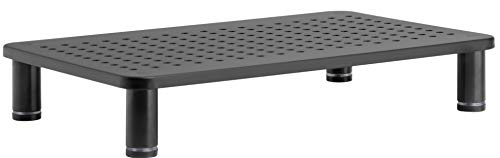
The Husky Mounts Monitor Riser provides an ergonomic lift for monitors and laptops with adjustable legs for height customization. Measuring 14.5″ x 9.25″ with a stackable design, it allows space beneath for storage and can be paired with a second stand for additional vertical height. The matte steel construction and perforated top promote air circulation, while the under-platform space helps maximize desk efficiency for printers, papers, or accessories.
Buying Guide
Key considerations when selecting a monitor stand for your desk include size, weight capacity, mounting method, and adjustability. Start by confirming that your monitor(s) fit the stand’s VESA pattern (common sizes include 75x75mm and 100x100mm) and do not exceed the recommended weight per arm or base. If you use multiple screens, a dual-monitor stand with independent or synchronized adjustment can reduce neck strain by aligning screens at eye level. For smaller desks, choose compact stands with space-saving bases and elevated arms to free up surface area beneath the stand for documents or a small keyboard tray.
Mounting options matter for stability and desk integrity. C-clamp or grommet bases are reversible solutions that avoid drilling, but require enough desk thickness and clearance beneath the surface. A freestanding design offers portability and easy relocation, but may need a heavier base to prevent tipping. In terms of ergonomics, prioritize stands with tilt, swivel, and rotation capabilities to customize viewing angles and reduce glare. Ventilation is another factor; stands with perforated or open shelves prevent heat buildup for electronics, particularly when stacked with printers or desktop PCs.
Build quality and materials influence longevity and warranty coverage. Metal shelves and powder-coated finishes tend to resist wear and provide greater stability under load. Cable management features help maintain an organized workspace and prevent cords from snagging. If you frequently move offices or rearrange layouts, consider a modular or stackable design that scales with changing needs. Finally, assess any integrations or extra storage beneath the stand—some models provide under-shelf space ideal for small accessories, notebooks, or external drives.
Compared perspectives:
- Single-monitor stands are typically lighter and more compact, ideal for small desks or desktops where space is at a premium.
- Dual-monitor stands offer increased productivity by keeping two screens at an equivalent visual plane, though they require more desk space and careful weight distribution.
- Clamp-based mounts minimize desk modification but demand adequate edge thickness and clearance; freestanding options are easier to reposition but may require heavier bases for stability.
- Ventilated or perforated surfaces help with airflow for devices that run hot, reducing heat buildup during long work sessions.
- Customizable height and pivot ranges matter if you alternate between reading and coding or design work, enabling comfortable eye level and reduced neck strain.
When comparing these options, consider your desk dimensions, the typical size of your monitors, and whether you value portability or maximum permanence. The reviewed stands provide a spectrum of solutions—from simple, budget-friendly single-monitor supports to robust dual-monitor systems with flexible mounting options. Your selection should align with your space, work tasks, and long-term comfort goals.