Finding a standing desk solution that comfortably supports three monitors is essential for productivity and ergonomic health. The following selections are among the top-rated three-monitor setups, balancing stability, adjustability, and space efficiency. Each option is designed to keep monitors at comfortable eye level while you switch between sitting and standing. Below you’ll find quick product highlights, feature details, and what to consider when choosing the right triple-monitor stand or desk converter for your workspace.
| Product | Key Benefit | Weight Capacity (per arm) |
|---|---|---|
| WALI Triple Monitor Stand MF003 | Free-standing with 360° rotation and wide monitor compatibility | 22 lbs |
| Rocelco 46″ Large Height Adjustable Desk Converter | Extra-large work surface with a retractable keyboard tray | N/A |
| VIVO STAND-V003E Triple LCD Desk Stand | Heavy-duty three-monitor support with solid base | 10 kg per monitor |
| HUANUO Triple Monitor Mount (13-27”) | Aluminum build with full motion articulation | 17.6 lbs per arm |
| HUANUO Triple Monitor Mount (17-32”) | Wide compatibility and flexible adjustment | 17.6 lbs per arm |
The following sections spotlight each option with a concise overview and the core features that matter when you’re balancing three displays at a standing desk height. All sections include a direct link to the Amazon product page for quick reference.
WALI Triple Monitor Stand MF003

This free-standing triple monitor stand supports up to 27″ displays with a 22 lbs per-arm capacity. It features detachable mount plates and adjustable height for compatibility with VESA 75x75mm or 100x100mm patterns. The 4” grommet-base accommodates desk thickness from 0.3” to 2.4”, while a free-standing V-base provides flexible placement on any desktop. Arm extends and retracts, with center monitor tilt of ±15° and side monitors tilt up to ±90°. Swivel and rotate allow landscape or portrait orientations for optimal reading angles.
Rocelco 46″ Large Height Adjustable Desk Converter

The Rocelco converter provides a spacious 45.75″ x 23.25″ surface ideal for three monitors and a retractable keyboard tray (25.75″ x 11.25″). The height range from 5″ to 20″ supports a broad user profile. An optional Deluxe Floor Stand creates a fully standalone standing desk. The ergonomic keyboard tray maintains airflow and alignment with a consistent 4.5″ gap to the main surface, promoting comfortable typing angles as you alternate between postures.
VIVO Triple LCD Desk Stand STAND-V003E
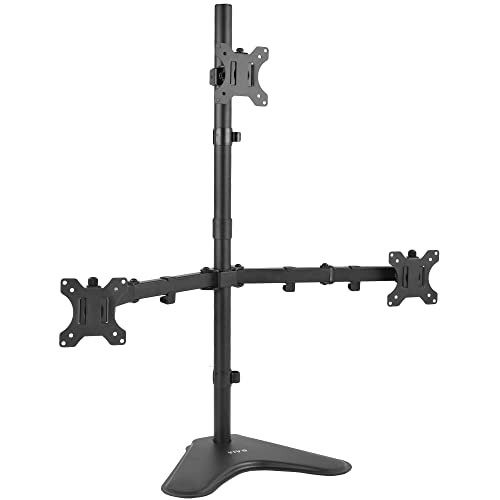
VIVO’s STAND-V003E holds three monitors from 13″ to 30″ with a sturdy base and heavy-duty construction. Each arm supports +15° to -15° tilt, 360° swivel, and 360° rotation, with height adjustment along the center pole. The base includes desk padding for surface protection, and cable management clips help reduce clutter. The setup supports portrait or landscape configurations, enabling a flexible, ergonomic tri-monitor arrangement.
HUANUO Triple Monitor Mount (13-27”)

This Huanuo mount supports monitors 13″–27″ with VESA 75x75mm or 100x100mm. Each arm holds up to 17.6 lbs and offers a full range of motion, including 360° rotation, ±90° swivel, and ±45° tilt, plus a height-adjustable center pole for optimal viewing angles. It’s designed to free up desk space while enabling portrait or landscape monitor alignment and tension-adjustable tilt for precise viewing.
HUANUO Triple Monitor Mount for 17–32”

Designed to fit 17″–32″ monitors with VESA 75x75mm or 100x100mm, this Huanuo triple-monitor system accommodates up to 17.6 lbs per arm. It offers a full suite of adjustments: tilt, swivel, rotation, and height positioning to tailor angles for each monitor. The clamp and grommet kit options help secure the setup to various desk configurations while maintaining accessible cable routing.
All five options deliver solid support for three-monitor configurations at standing desk heights, with varying emphasis on base stability, mounting versatility, and space efficiency. When evaluating a setup, consider desk thickness, monitor weight, VESA compatibility, and your preferred posture during long work sessions to minimize neck and shoulder strain.
Buying Guide
Key purchase considerations allow you to compare triple-monitor setups effectively. Here are several angles to evaluate:
- Mount type and stability: Free-standing stands are easier to reposition, while grommet or clamp mounts save desk space and reduce tipping risks for heavier monitors.
- Weight capacity and monitor size: Ensure per-arm capacity supports your heaviest monitor and check the maximum screen size for each arm.
- Adjustability range: Look for tilt, swivel, rotation, and height adjustability to achieve ergonomic eye level and minimize neck strain.
- Desk compatibility: Confirm desk thickness, edge type, and whether a grommet base or clamped mount fits your workspace.
- Cable management: Integrated clips or channels help keep cables organized and out of the way during transitions between sitting and standing.
- Assembly and mobility: Some options are easier to assemble and reconfigure, which matters for frequent workspace rearrangements or relocations.
- Expansion and compatibility: If you plan to add or swap monitors later, verify compatibility with future sizes and mounting patterns.
In selecting a three-monitor standing setup, align your choice with your desk surface, reach distance, and the primary tasks you perform. For gaming, designating a central monitor for the main action with adjustable side displays can improve immersion. For productivity or design work, prefer configurations with precise height adjustment and secure locking mechanisms to maintain a steady, glare-free viewing experience across all screens.