Finding the right desk setup for multitask workflows, gaming, or content creation means balancing monitor compatibility, stability, and desk space. The following guide highlights five top dual and triple monitor stands and related desks that support multiple screens, with careful attention to mounting options, weight limits, and desk compatibility. Each choice is evaluated on ease of installation, durability, and ergonomic potential to help you create a productive, clutter-free workstation.
| Product | Brand | Mount Type | Screen Range | Weight Capacity | Notes |
|---|---|---|---|---|---|
| HUANUO Dual Monitor Stand | HUANUO | C Clamp or Grommet | 13″–32″ | 4.4–19.8 lbs per monitor | Strong build, clear guidance on desk compatibility |
| WALI Triple Monitor Stand | WALI | Free Standing or Grommet | Up to 27″ | 22 lbs per arm | Flexible mounting options, wide tilt/swivel range |
| WESTREE Triple Dual Monitor Stand | WESTREE | Riser with Drawer | 2–3 monitors | Typically varies by model | Integrated organizer and adjustable length |
| BONTEC Dual Monitor Stand Riser | BONTEC | Back/Front Elevation | 31.5″–42.5″ | Multiple per setup | Ergonomic height and large storage |
| Simple Trending Dual Monitor Stand | Simple Trending | Desk Stand | 2 monitors | 260 lbs total on glass base | Tempered glass surface and adjustable length |
HUANUO Dual Monitor Stand

The HUANUO dual monitor mount supports two screens within a 13″–32″ size range and a weight capacity of 4.4–19.8 lbs per arm. It offers two desktop installation options—C-clamp or grommet base—providing flexible fit for most wooden desks. To ensure safe use, the product notes emphasize compatibility requirements for both monitors (VESA 75x75mm or 100x100mm mounting) and desks (wooden construction, 0.59″–3.54″ thickness, no obstructive cross beams underneath). The design prioritizes stability with a unique structure that strengthens fixation and reduces wobble, supporting long hours of viewing or work.
Key features include robust articulation, full-range tilt, and a compact arm arrangement that helps reduce monitor footprint on the desk. Installation guidance is explicit about desk and monitor prerequisites, helping buyers avoid incompatible configurations. This setup is suitable for productivity tasks, coding sessions, and multi-document workflows where screen real estate is essential.
WALI Triple Monitor Stand

The WALI triple monitor stand is designed for up to 27-inch displays with a 22 lb per-arm capacity. It supports VESA 75x75mm or 100x100mm mounting, offering both a free-standing base and a 4″ diameter grommet-base option. This flexibility makes it adaptable to various desk thicknesses and configurations. The arms provide full motion: tilt, swivel, and panoramic rotation, enabling precise alignment and easy transition between landscape and portrait modes. Height can be adjusted along a 16″ pole, allowing ergonomic eye level alignment across three monitors for expansive multi-monitor setups.
Practical design details include detachable mount plates and straightforward assembly. The stand is well-suited for office or gaming environments where a three-monitor layout is needed for seamless multi-document viewing, development, or streaming setups. The brawny construction aims to minimize wobble, and the multiple mounting configurations help accommodate different desk shapes and sizes.
WESTREE Triple Monitor Stand Riser

The WESTREE monitor riser is designed for two to three displays and includes a large built-in drawer for storage. Its adjustable length spans from 29″ to 56″ with a +/-90-degree tilt for each monitor, enabling users to tailor the viewing angle and distance. The extended length makes it a viable option for wide desk configurations and collaborative setups where multiple screens are required side by side. The integrated drawer adds practical storage, helping to keep a workspace organized and free of clutter, while the overall riser height places monitors at a comfortable eye level to enhance posture during long work sessions.
Considerations include ensuring the desk can handle the length and weight distribution, as well as verifying that the monitors’ VESA patterns align with the mounting plates. This model suits environments where screen real estate is a priority alongside additional desk organization features.
BONTEC Dual Monitor Stand Riser
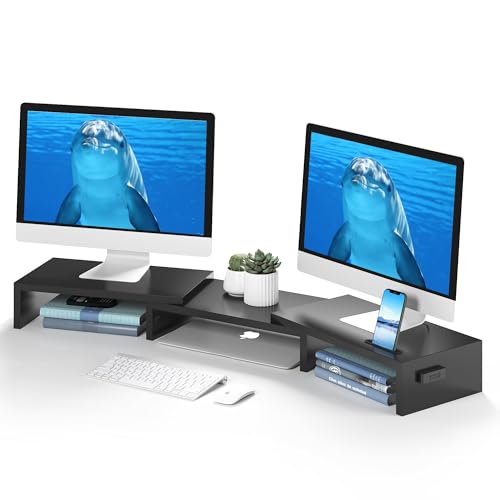
The BONTEC dual monitor stand riser emphasizes ergonomic height adjustment and generous support for two displays. It offers adjustable length from 31.5″ to 42.5″ to fit varying desk sizes and works well on desks that need a higher viewing position. The unit also includes designated space for a smartphone holder and other devices, which helps reduce desktop clutter while maintaining accessible device placement. The stand supports both smaller and larger desks, making it a flexible choice for shared workspaces, home offices, or dedicated gaming rigs. The perceived benefit is improved neck and shoulder alignment by bringing monitors to eye level, which can be important for extended use.
Prospective buyers should verify compatibility with their desk thickness and monitor VESA patterns. Weight distribution and stability are considerations when mounting heavier displays, particularly at maximum extension. This model blends ergonomic design with practical storage and aesthetic appeal for modern workstations.
Simple Trending Dual Monitor Stand

The Simple Trending dual monitor stand features a tempered glass surface with a maximum load capacity of 260 lbs, providing a sturdy base for two monitors. The stand offers three configuration modes: Compact, Full Extension, and Wide Angle, with adjustable length from 28.37″ to 41.5″. This flexibility makes it suitable for various desk depths and work styles. The ergonomic aim is to elevate displays to eye level, reducing neck and back fatigue during long sessions. The tempered glass top contributes to a clean, professional look while maintaining load-bearing reliability.
Considerations include ensuring desk clearance for the extended arms and confirming compatibility with monitor VESA patterns. The glass base may require careful placement to avoid scratches on certain desk finishes. This option balances visual appeal with functional adaptability for multi-monitor workflows.
OPNICE Desk Organizers and Accessories

The OPNICE desk organizer offers a dual monitor stand riser with a built-in drawer and two pen holders. It focuses on combining monitor elevation with practical storage to keep essential office items within reach. The design aims to clear desk space by raising monitors and freeing surface area beneath for keyboards, printers, or files. This configuration can improve workflow efficiency by reducing visual clutter and enabling a more organized workspace. The product emphasizes both ergonomic positioning and practical organization, fitting home offices, workspaces, and dorm setups.
When evaluating, consider desk height, monitor weight, and VESA compatibility. The included storage features are beneficial for users who want a tidy, compact arrangement without sacrificing screen real estate.
Buying Guide: Key Purchase Considerations
- Monitor compatibility: Check screen size range, weight per arm, and VESA mounting patterns (75x75mm or 100x100mm) to ensure mounting compatibility with the chosen stand.
- Desk compatibility: Confirm desk material, thickness, and space under the desk to accommodate mounting hardware, clamp or grommet bases, and overall height without interference from cross beams.
- Mounting option and stability: Decide between C-clamp, grommet, or freestanding bases based on desk construction and aesthetic preference. Stability is essential for long sessions and for two or three monitors mounted simultaneously.
- Adjustability and ergonomics: Evaluate tilt, swivel, and rotation capabilities to align monitors at eye level. Consider arm reach and extension limits to fit your seating position and workflow.
- Storage and desk organization: Some stands incorporate drawers or shelves. Weigh the value of added storage against potential footprint changes on the desktop.
- Future expandability: If you plan to upgrade monitors or add more displays later, prioritize stands that support extended ranges or additional arms.
- Build quality and materials: Look for steel or reinforced alloys for durability, and check warranty terms where available.
- Cable management: Favor solutions with integrated channels or clips to minimize cable clutter and protect cables from wear.
In choosing a setup, balance the number of monitors with desk size, monitor weight, and desired ergonomic outcomes. Users in gaming, software development, or financial trading often prioritize stability and adjustability to maintain consistent posture and unobstructed visual access across all screens.