Finding a portable work station that extends your laptop’s capabilities without weighing you down can transform remote work, travel, and on-site tasks. The following selections emphasize lightweight design, easy setup, and reliable multi-display performance to help you stay productive wherever you are. Each option offers different connection methods, sizes, and features to fit 14″–16″ laptops and varying workstyles. Read on to compare five strong contenders and a practical buying guide to refine your choice.
| Product | Brand | Key Benefit |
|---|---|---|
| HONGO Laptop Screen Extender | HONGO | Triple screen setup for multitasking |
| Teamgee 12″ Laptop Screen Extender | Teamgee | Plug-and-play dual/three-display options |
| QQH Laptop Screen Extender | QQH | Ultra-slim tri-screen with easy USB-C/USB-A plug |
| Umaniy M61 USB C Hub Portable Stand | Umaniy | Combo stand and USB hub for compact setups |
| ONKRON Mobile Laptop Cart | ONKRON | Height-adjustable rolling desk with storage |
HONGO Laptop Screen Extender: Triple Screen On The Go

The HONGO screen extender is designed for laptops sized 14″ to 16″ and connects without drivers. It offers three screens with 1080p FHD IPS quality, a brightness of 300 nits, and a 1000:1 contrast ratio. With 270° rotation on the dual monitor and a 180° adjustable bracket, you can arrange layouts to fit your workflow. Connection varies by OS: Windows requires a single USB-C cable, while macOS typically needs two USB-C cables. This model targets remote workers, IT professionals, and mobile users who need rapid multi-tasking without complicated setup.
In practice, the HONGO extender supports quick switching between tasks with multiple windows, reducing the need to constantly drag content between tabs. The built-in stand and flexible viewing angles help maintain a comfortable posture during extended work sessions. Note that MacBook users should confirm 2-display compatibility on their device, as some configurations may mirror rather than extend the display.
Teamgee 12″ Laptop Screen Extender
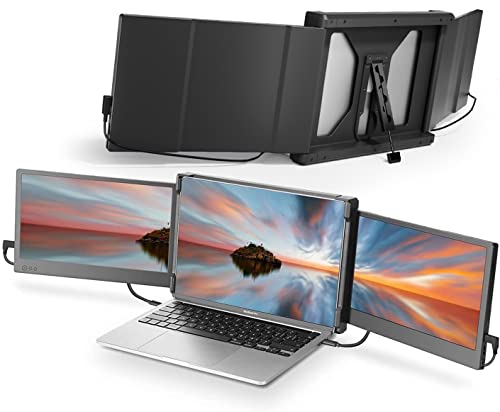
Teamgee’s compact dual/triple display solution suits laptops in the 13″–16″ range and emphasizes plug-and-play versatility. It supports multiple connection configurations, including USB-C, HDMI, and USB-A, allowing setup with or without a docking station. The product notes highlight a stable, driver-free experience when using USB-C ports, but some combinations may require an external power source to maintain signal stability. It’s a practical choice for frequent travelers who need a reliable additional screen for multitasking, presentations, or coding sessions on the go.
QQH Laptop Screen Extender: Ultra-Slim Triple Display

The QQH Z80A model features an ultra-slim 15.6″ dual display with 1080P IPS panels and a 178° viewing angle. It highlights a one-cable plug-and-play experience after driver installation, using a USB-C or USB-A connection to simplify cable management. The aluminum alloy tri-screen design offers stability and a sleek profile that sits behind your laptop, minimizing bulk while expanding your visual workspace. This option is well-suited for users who need a discrete, high-capacity multi-monitor approach without heavy equipment.
Umaniy M61 USB C Hub Portable Stand

This 2-in-1 setup combines a four-port USB 3.0 hub with an adjustable laptop stand, crafted from an aluminum shell for durability and a polished look. It’s designed for data transfer speeds up to 5Gbps and is optimized for data sync rather than charging. The stand elevates your screen to improve posture, making it a compact solution for travelers who need a lightweight hub and a stable typing angle without a bulky docking station.
ONKRON Mobile Laptop Cart On Wheels

ONKRON’s rolling laptop cart is a versatile, height-adjustable workstation with a robust wheel system. It supports a wide range of tasks—from small presentations to classroom use—thanks to a pneumatic-height adjustment and cable management. The cart’s generous top platform accommodates a laptop and a monitor or accessory devices, while its locking wheels provide stability once positioned. It’s particularly suitable for classrooms, medical facilities, or shared workspaces where mobility and presentation capability matter.
Buying Guide: Key Purchase Considerations
- Display configuration: Decide between dual or triple displays, and consider whether you need full extension or mirror modes. Check compatibility with your laptop size (14″–16″) and monitor angles that suit your workflow.
- Connection options: USB-C-only setups reduce cable clutter, but some devices require USB-C + HDMI or USB-A for full functionality. Ensure your laptop supports the intended configuration without drivers.
- Portability vs. stability: Slim, lightweight extenders are easy to pack but may compromise on rigidity. Heavier, rugged stands (like rolling desks) offer stability for frequent transport and varied work environments.
- Posture and ergonomics: Elevation, tilt, and rotation impact comfort during long sessions. Look for adjustable brackets, 180°–270° rotation ranges, and screen height alignment with your keyboard.
- Power and charging: Some solutions require external power to maintain signal integrity. If you rely on long sessions, verify whether charging is supported to avoid depleted devices mid-work.
- Compatibility notes: MacBooks, particularly with newer configurations, may experience limitations or require specific connection sequences. Verify whether multi-display extension is fully supported on your model.
- Durability and materials: Aluminum frames and solid brackets improve longevity for travel and frequent setup changes. Consider weight limits and the ability to endure daily wear.
- Use case scenarios: Remote work, presentations, coding, design tasks, or media consumption each benefit from different arrangements—plan according to your primary activities.