Workspace optimization matters when two people share a desk. The right dual-monitor desk blends ample space, sturdy construction, integrated storage, and ergonomic monitor elevation. Below are five top Amazon picks designed to support two monitors, plus features like cable management, USB ports, LED lighting, and dedicated monitor stands. Use this guide to compare layouts, storage options, and ergonomic benefits for home offices, study nooks, or shared gaming setups.
| Product | Brand | Key Benefit |
|---|---|---|
| Casaottima 98 Inch Two Person Desk | Casaottima | Extra-long dual workspace with LED lighting and built‑in monitor stand |
| Tribesigns Two Person Desk with Monitor Stand | Tribesigns | Spacious double desk with open storage shelves |
| Furologee 47″ Computer Desk | Furologee | Dual monitor stands, charging outlets, fabric file cabinet |
| CubiCubi 47 Inch Desk | CubiCubi | Monitor shelf and under-desk storage with sturdy framing |
| HUANUO Dual Monitor Stand | HUANUO | Adjustable dual monitor arms with mounting options |
These desks are designed to maximize two-monitor setups while preserving individual space, improving posture, and keeping the desktop organized. The following sections detail five solid options, each with a quick snapshot of what to expect in terms of design, storage, and ergonomics.
Casaottima 98 Inch Two Person Desk
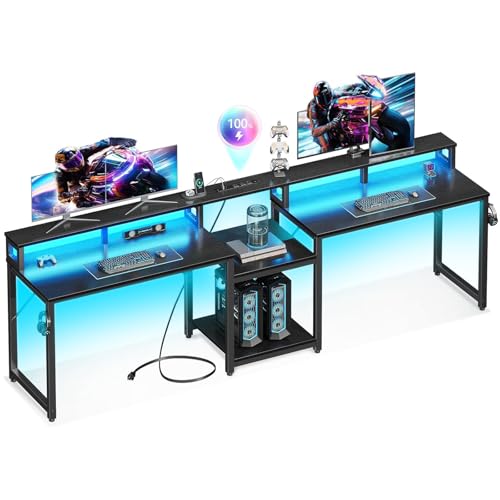
The Casaottima desk is designed for two, featuring an extra-long 97.6″ by 19.7″ workspace to accommodate two monitors, keyboards, and peripherals without crowding. A middle open storage shelf helps keep supplies within reach, while height-adjustable shelves provide flexible storage for electronics, documents, or decor. An integrated monitor stand elevates two monitors to ergonomic heights, potentially reducing neck strain. LED lighting with multiple modes adds ambiance and visibility for late work sessions. The setup is suitable for home offices, study rooms, or shared workspaces, balancing collaboration with individual organization.
Key considerations include assembly complexity, the overall footprint, and compatibility with room layout. The USB charging port and LED lighting are convenient features, especially for shared desks, but ensure the electrical access and cable routing fit your space. The design emphasizes a clean surface with dedicated storage, supporting two people working side by side while maintaining personal space.
Tribesigns Two Person Desk With Monitor Stand

The Tribesigns desk offers a generous 78.74″ length and 27.56″ depth, providing a spacious double workstation with four open storage shelves and two monitor stands. The elongated design helps two users work side by side without crowding, making it ideal for shared study spaces or a duo gaming setup. The ergonomic monitor stands place screens at a comfortable height to reduce neck fatigue. The desk’s wood-toned finish adds warmth to a home office or living area, while multiple shelves help organize peripherals, books, and supplies.
Considerations include the larger footprint required for installation and how the added storage shelves impact legroom. The double desk design supports collaboration or simultaneous tasks, but ensure your chairs and seating arrangement align with the desk length for comfortable two-person use over long sessions.
Furologee 47″ Computer Desk With Storage and Outlets

The Furologee desk combines compact dual-monitor capability with practical power access and storage. It features built-in 3 power outlets and 2 USB charging ports to keep devices powered during work or gaming sessions. Two movable monitor stands heighten screens for ergonomic alignment, reducing neck strain. A fabric file cabinet and 2-tier storage shelves offer room to organize documents, printers, and peripherals, helping maintain a tidy desktop. This model suits compact home offices, bedrooms, or dorm setups where power needs are a priority.
Potential drawbacks include limited overall desk space due to its 47″ footprint, which may be tight for large monitor configurations. Evaluate whether the combination of power outlets and shelves matches your workflow and whether you need more space or a dedicated CPU/tower area.
CubiCubi 47 Inch Desk With Monitor Stand

The CubiCubi desk emphasizes a balance of monitor support and under-desk storage. The upper shelf provides a dedicated space for a monitor, keeping the main desk surface clear for keyboards and peripherals. Under-desk open shelves add storage for clutter-prone items, while a keyboard tray helps free desktop space. The frame is designed for stability, with an X-shaped crossbar reinforcing the structure. This layout is well-suited for two monitors in a compact footprint, making it a good fit for smaller rooms or shared apartments where space efficiency matters.
Users should assess whether the under-desk clearance is sufficient for leg comfort and whether the height of the monitor shelf aligns with their seated posture. This model prioritizes storage density and monitor elevation within a modest size budget.
HUANUO Dual Monitor Stand

The HUANUO dual monitor stand focuses on adjustable arms with flexible mounting options, designed to fit 13 to 32-inch screens weighing 4.4 to 19.8 pounds each. It supports either a C-clamp or grommet mounting base, offering versatile installation depending on desk type. While this is a standalone mount rather than a full desk, it is a strong choice for upgrading an existing desk to a dual-monitor configuration with optimal tilt, swivel, and height adjustments. It requires a compatible desk and proper space for arm extension, but it provides robust ergonomics for two-monitor tasks.
Important considerations include desk thickness, absence of obstructive cross beams, and ensuring VESA compatibility on both monitors. This option is ideal for users who already own a desk and want to optimize ergonomics and desk space with adjustable monitor arms rather than a full new desk solution.
Buying Guide: Key Purchase Considerations
When selecting a desk for two monitors, consider these dimensions to ensure the setup fits your space and workflow:
- Desk footprint and two-person ergonomics: Measure room dimensions and chair spacing to avoid crowding. Look for long, spacious desktops or dual-workstations with shared shelves that still provide individual space.
- Monitor elevation and alignment: A dedicated monitor stand or shelving helps position screens at eye level, reducing neck strain. Ensure the height is adjustable to accommodate different seating positions.
- Storage and organization: Choose desks with shelves, drawers, or filing solutions to keep cables and accessories tidy. Under-desk storage can free up the main surface for keyboards and peripherals.
- Power and connectivity: Built-in USB ports or easily accessible outlets are convenient, but verify cable management options and electrical safety in your room.
- Sturdiness and materials: Look for durable frames (metal or reinforced wood) and stable bases. A well-built desk minimizes wobble when two people use it simultaneously.
- Assembly and maintenance: Check the complexity of assembly and whether installation requires additional tools. A modular design can simplify adjustments over time.
- Compatibility with existing hardware: Confirm monitor sizes, VESA patterns, and whether the desk or stand can accommodate your monitor stands and arms without obstruction.
- Aesthetic and room style: If the space is visible in living areas or bedrooms, choose finishes and colors that complement your decor while still delivering practical functionality.
For shared spaces, prioritize ergonomics and organization: a desk that elevates two monitors with a clean surface, plus accessible storage, helps collaborators stay productive without bumping into each other’s work zones. Balancing length, storage, and accessibility will guide you to the best fit for your two-monitor setup.