For standing desk users, a reliable dual monitor arm setup can boost ergonomics, reduce neck strain, and keep your workspace organized. This article highlights five top dual monitor arms that perform well with standing desks, balancing stability, range of motion, and ease of installation. Each pick supports common VESA patterns and fits a variety of screen sizes, helping you find a comfortable, productive viewing position throughout the workday.
| Product | Brand | Key Feature |
|---|---|---|
| HUANUO Dual Monitor Stand (HNDS6) | HUANUO | Two mounting options; strong stability; wide range of motion |
| VIVO Dual Monitor Desk Mount STAND-V002 | VIVO | Heavy-duty, easy articulation, solid C-clamp or grommet |
| VIVO Dual Monitor STAND-V002O | VIVO | Ultrawide capability, pneumatic/mechanical counterbalance |
| ErGear Dual Monitor Desk Mount | ErGear | Up to 40″ screens, strong build, deep reach |
| HUANUO NITROGLIDE HNDS7 | HUANUO | Enhanced stability, larger arms, extended reach |
HUANUO Dual Monitor Stand (HNDS6) Review

Designed for stability, the HUANUO HNDS6 features a dual-arm configuration with two installation modes: C-clamp or grommet base. It supports monitors from 13 to 32 inches, weighing 4.4 to 19.8 lbs each, and requires VESA 75x75mm or 100x100mm patterns. The design emphasizes a robust structure to reduce wobble and improve load distribution, making it suitable for standing desks. Compatibility notes advise ensuring desks are wooden and free of obstructions under the mounting area for secure installation.
VIVO STAND-V002 Dual Monitor Desk Mount

This heavy-duty VIVO model fits two screens from 13” to 30” and up to 22 lbs per monitor, with VESA 75x75mm or 100x100mm mounting holes. It offers a full range of motion: +90° to -90° tilt, 180° swivel, 360° rotation, plus height adjustment along the center pole. A robust C-clamp or optional grommet mount secures the assembly to the desk, supporting dynamic standing workstations while keeping cables organized with attached clips.
VIVO STAND-V002O Pneumatic Dual Monitor Arm
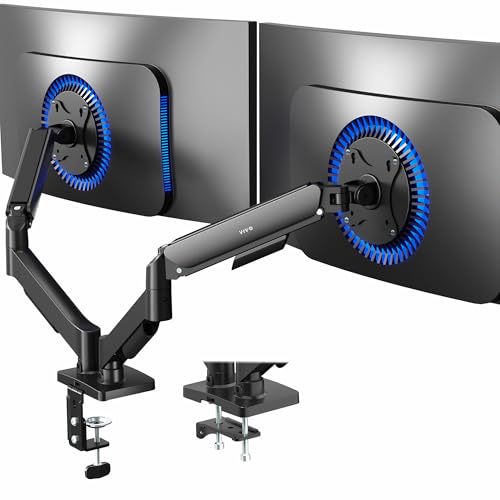
The STAND-V002O emphasizes ultrawide compatibility with most 17″–32″ screens and weights up to 19.8 lbs per arm. Its pneumatic counterbalance system supports smooth, tool-free adjustment of monitor position in multiple directions. The arms provide +90° to -90° tilt, 180° swivel, and 360° rotation for portrait or landscape setups, enabling flexible layouts on standing desks where space is at a premium.
ErGear Dual Monitor Desk Mount (Up to 40″)

ErGear’s dual monitor arm supports 13″ to 40″ screens with a maximum 26.4 lbs per arm and VESA 75x75mm or 100x100mm. The mount uses a sturdy aviation-aluminum build, designed for deep desks. It offers a wide motion range: 85° to -30° tilt, 180° swivel, and 360° rotation. A notable feature is its durability and rapid, adaptable positioning, making it a strong choice for extended standing sessions where monitors need to be repositioned quickly.
HUANUO NITROGLIDE HNDS7 Dual Monitor Stand

The NITROGLIDE HNDS7 increases stability with larger arms, a stronger base, and a dual C-clamp configuration to support heavier ultrawide monitors up to 26.4 lbs per arm. It offers adjustable height up to 21.1 inches and extension up to 25.59 inches, ideal for deep desks. Full motion includes -30° to +85° tilt, -90° to +90° swivel, and 360° rotation, enabling precise alignment for standing work. The arm design prioritizes smooth, precise adjustments for varied viewing angles.
Buying Guide: Key Considerations For Standing Desk Setups
- Screen size, weight, and VESA compatibility: Ensure each monitor fits within the arm’s supported range (13–40 inches typical) and weighs within the specified limits per arm. Verify VESA patterns (75x75mm or 100x100mm) match your displays.
- Desk compatibility and installation method: Check desk material, thickness, and clearance under the desk to confirm C-clamp or grommet installation will work. Some desks require drilling for grommet mounts.
- Range of motion and reach: Look for arms offering tilt, swivel, and rotation plus height adjustment. For standing desks, ample vertical adjustability helps maintain neutral eye level and posture as you alternate between positions.
- Stability and wobble control: Heavier monitors or ultrawide screens benefit from larger bases, dual C-clamps, or heavy-duty arms. A well-balanced setup reduces monitor sway during movement or typing.
- Cable management: Built-in clips or channels help keep cables organized, reducing desk clutter and snag risks during transitions from sit to stand.
- Durability and service life: Consider aluminum or steel constructions with tested joint mechanisms. Look for models with positive user reviews on long-term use and load handling.
- Installation time and tools: Some mounts require complex assembly, while others are tool-free or quick-mount designs. If you frequently reposition monitors, prioritize ease of installation.
- Future expandability: If you plan to add more displays or heavier setups later, choose mounts with higher weight capacities and larger universal VESA support.