Choosing the right dual monitor mount can improve desk organization, posture, and productivity by freeing up space and enabling precise viewing angles. This guide highlights five reliable options that fit a range of desk types and monitor sizes, with sturdy build quality and versatile mounting methods. Each pick supports common VESA patterns and offers full motion adjustments to help you customize your workspace.
Summary of selected products:
| Product | Brand | Screen Range | Max Weight (per arm) | Mount Type | Key Benefit |
|---|---|---|---|---|---|
| HUANUO Dual Monitor Stand – Full Adjustable | HUANUO | 13″–32″ | 19.8 lbs | C-clamp / Grommet | Strong stability with dual C-clamp design |
| VIVO Dual Monitor Desk Mount STAND-V002 | VIVO | 13″–30″ | 22 lbs | C-clamp / Grommet | Wide tilt/swivel range with ergonomic adjustments |
| HUANUO NITROGLIDE™ Dual Monitor Stand (HNDS7) | HUANUO | 13″–40″ | 26.4 lbs | C-clamp / Grommet | Higher weight capacity and smooth glide tech |
| HUANUO 17-32 Inch Dual Monitor Stand | HUANUO | 17″–32″ | 19.8 lbs | Noted C-clamp / Grommet | Strong compatibility with extended height design |
| ErGear Dual Monitor Stand | ErGear | 13″–32″ | 17.6 lbs | Noted C-clamp / Grommet | Large arm span for two wide screens |
HUANUO Dual Monitor Stand — Full Adjustable

The HUANUO dual monitor stand supports 13″–32″ screens with VESA patterns of 75x75mm or 100x100mm and a weight range of 4.4–19.8 lbs per monitor. It offers two desktop mounting options—C-clamp or grommet base—and emphasizes stability with a structural design to reduce movement. Its compatibility guidance notes desk material and thickness, encouraging careful verification before purchase to avoid issues. This model provides a balanced combination of robust build and flexible mounting for a desktop setup.
VIVO Dual Monitor Desk Mount STAND-V002

VIVO STAND-V002 fits two monitors from 13″ to 30″ with a weight capacity up to 22 lbs per arm, featuring VESA 75x75mm or 100x100mm compatibility. It offers +90° to -90° tilt, 180° swivel, 360° rotation, and column-based height adjustment for portrait or landscape orientation. A heavy-duty C-clamp mounts to desks up to about 3.25″ thick, with a optional grommet base for alternative installation. This model excels in versatility and range of motion for varied viewing angles.
HUANUO Dual Monitor Stand — White

This HUANUO model shares the same core compatibility with 13″–32″ monitors and VESA 75x75mm or 100x100mm patterns, supporting 4.4–19.8 lbs per arm. It highlights two desk installation choices—C-clamp and grommet base—for secure mounting. The description emphasizes stability and strength improvements, making it suitable for users seeking a reliable dual-monitor setup with straightforward adjustments and solid construction.
HUANUO NITROGLIDE Dual Monitor Stand (HNDS7)

HUANUO NITROGLIDE supports 13″–40″ displays, with a higher weight capacity of up to 26.4 lbs per arm and VESA mounting options of 75×75mm or 100×100mm. It uses NITROGLIDE technology for smoother adjustments and offers taller arms—up to 21.1″ of lift and up to 25.59″ extension—benefiting taller users or large desks. Full motion includes -90° to +90° tilt, -30° to +85° tilt, and 360° rotation for comprehensive angle control.
HUANUO 17-32 Inch Dual Monitor Stand
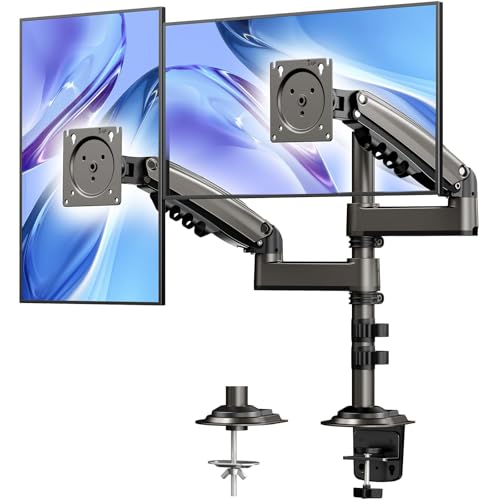
This HUANUO model offers 17″–32″ support with 4.4–19.8 lbs per monitor and VESA 75/100mm compatibility. It includes an additional height design with a tall column allowing up to 25.19″ from the desk to the center of the monitor. It supports 90° tilt, 180° swivel, and 360° rotation to tailor your viewing angle. Aimed at users needing extra height range, this option integrates easy adjustments with sturdy construction.
ErGear Dual Monitor Stand

ErGear’s dual monitor stand supports two screens from 13″ to 32″ with a 17.6 lb per-arm limit and VESA 75×75 mm or 100×100 mm. It features a broad arm span and a high mounting bar for extensive adjustability, including +/-90° tilt, +/-45° tilt, and 360° rotation. The product emphasizes flexible positioning suitable for gaming setups, multitasking desks, or expanded workstations, making it a versatile choice at a competitive price point.
Buying Guide
Key considerations when choosing a dual monitor mount:
- Compatibility: Verify monitor size (inches), weight per monitor, and VESA pattern (75x75mm or 100x100mm). Ensure the desk and mounting surface can support the chosen clamp or grommet base.
- Mounting method: C-clamp provides quick installation and portability; grommet mounts require desk holes or openings but can offer greater stability on thick desktops.
- Adjustability: Look for tilt, swivel, and rotation ranges that suit your work style. A higher arm reach or gas spring/adjustable tension can reduce neck strain.
- Height and reach: Consider whether you need extra height or depth adjustment to align the monitors with eye level and seating position.
- Build quality: Aluminum arms generally offer sturdy support and smoother motion, especially for heavier or wider monitors.
- Desk compatibility: Some models specify desk material and thickness; wooden desks are typically recommended, and there may be restrictions about cross beams or panels under the desk.
- Cable management: Integrated clips help keep cables organized and reduce clutter behind the monitors.
Depth considerations include whether you prefer portrait or landscape mounting, how often you rotate monitors, and whether you share the desk with other peripherals. For taller users or large ultrawide displays, models with extended height and longer reach—such as the NITROGLIDE line—provide enhanced comfort and flexibility. Always review product specifications and user guides to ensure compatibility with your existing setup.