Discover top quad monitor mounts designed to hold four screens on your desk. This guide highlights models that balance strength, flexibility, and desk space savings for multi-monitor setups. Each option supports common VESA patterns, tilt, swivel, and rotation, helping you tailor ergonomics for work, gaming, or productivity. Below, you’ll find a quick product overview, followed by in-depth sections for five standout mounts and a practical buying guide to compare features and determine which model best fits your workspace.
| Product | Key Feature | Screen Range |
|---|---|---|
| MOUNT PRO Quad Monitor Stand | Full motion with +90° to -90° tilt, 180° swivel, 360° rotation | 13″–32″ |
| WALI Quad Monitor Desk Mount (M004) | Two-stage locking system with C-clamp or Grommet base | Up to 27″ |
| VIVO STAND-V400D Quad Ultrawide | Heavy-duty aluminum arms for ultrawide screens | Up to 49″ |
| MOUNTUP MU3007 Quad Monitor Stand | Free-standing or clamp installation, full range tilt/swivel | 17″–32″ |
| PUTORSEN Quad Monitor Mount | Robust steel construction with VESA 75/100 mm | Up to 32″ |
MOUNT PRO Quad Monitor Stand

The MOUNT PRO Quad Monitor Stand supports four screens from 13 to 32 inches, with each arm handling up to 17.6 pounds. It uses VESA patterns of 75x75mm and 100x100mm and offers a full range of motion: tilt from +90° to -90°, swivel 180°, and 360° rotation. The design allows stacked or various configurations to optimize ergonomics and maintain a clean desk. A tall central pole enables higher mounting heights, which is advantageous for standing or higher seated posts. The C-clamp or grommet base provides versatile mounting options for different desk types.
Key specifications include wide compatibility with curved or flat panels, robust articulation for portrait or landscape layouts, and a focus on ergonomic viewing height. The mount is suitable for office workstations, trading desks, or creative setups where multiple screens are essential. Installation requires typical tools and follows standard VESA mounting practices, making it a practical upgrade for most desks.
WALI Quad Monitor Desk Mount (M004)
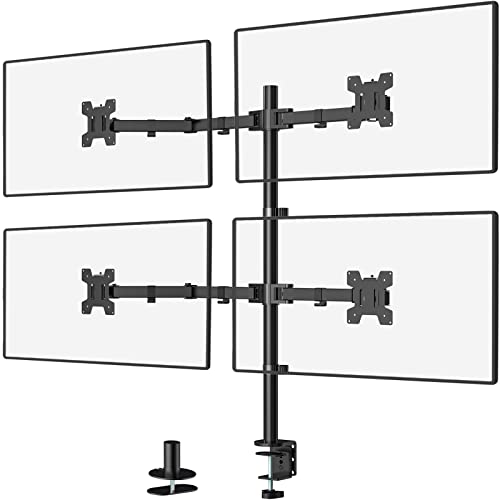
The WALI M004 Quad Monitor Desk Mount is designed to support up to four monitors up to 27 inches each, with a per-arm load capacity of 22 pounds. It offers detachable and height-adjustable mounting plates with 75x75mm and 100x100mm compatibility. The two-stage locking system accommodates both C-clamp and Grommet bases. The arms provide ±90° tilt and swivel, plus 360° rotation, enabling easy shifts between landscape and portrait orientations. This setup is ideal for programmers, traders, and multi-monitor workflows that require flexible alignment and a tidy desk footprint.
WALI Quad Monitor Mount for 13-27 Inch

Featuring universal compatibility for most 13″–27″ displays with up to 22 pounds per screen, this WALI model emphasizes space saving and cable management. The arms provide +35° to -35° tilt, ±90° swivel, and 360° rotation, with a maximum height reaching about 31.65 inches and extended reach up to 51.2 inches. This configuration supports both portrait and landscape viewing and is suitable for detailed coding, design, or analytics work requiring precise screen positioning and minimal desk clutter.
VIVO STAND-V400D Quad Ultrawide

The VIVO STAND-V400D is built for four ultrawide screens, with supports up to 49″ per monitor and an impressive 44 lbs per arm. Constructed from heavy-duty cast aluminum, its clamp base fits desktops up to 2″ thick. The joints allow +55° to -25° tilt, 180° swivel, and 360° rotation, ensuring flexibility for glare reduction and ergonomic viewing. This model is ideal for professional video editing, financial dashboards, or immersive simulation setups where very large displays are required.
PUTORSEN Quad Monitor Mount

The PUTORSEN quad monitor mount is built from heavy-duty steel and supports four displays up to 32 inches each, with a maximum of 22 pounds per screen. It features VESA 75x75mm and 100x100mm compatibility and offers a detachable VESA plate for straightforward installation. The mount supports tilt, swivel, and rotation for versatile viewing angles and a non-hole height adjustment system to precisely position all four screens. The design is optimized to free up desk space while maintaining strong stability and reliability.
Buying Guide
Key purchase considerations help you compare quad monitor mounts across different setups and budgets. Consider the following factors:
- Screen size and weight: Ensure the mount supports the maximum screen size and weight per arm. Heavier ultrawide panels may require models like the VIVO STAND-V400D or robust steel mounts.
- Mounting method: C-clamp, Grommet, or free-standing bases each have advantages. Grommet bases save desk surface but require a hole in the desk; clamps are easier to install on most desks.
- Adjustability: Tilt, swivel, and rotation range determine ergonomic effectiveness. Look for +/− tilt degrees, 360° rotation, and height adjustability for optimal posture.
- Desk space and footprint: Quad mounts should reduce desk clutter. Check the central pole height, arm reach, and overall footprint to ensure fit.
- Cable management: Integrated clips or channels help keep cables tidy, reducing wear and improving aesthetics.
- Installation complexity: Some models use simple clamps, while others involve removing desk panels or mounting plates. Consider your DIY comfort level.
- Compatibility: Verify VESA patterns (75x75mm or 100x100mm) and whether the mount accommodates both flat and curved panels.
- Materials and durability: Aluminum or steel builds offer different balance between weight, strength, and cost. Heavier duty options minimize sag with larger screens.
- Future upgrades: If you anticipate larger or additional monitors, ensure the chosen mount provides headroom in weight and size.
- Warranty and support: A solid warranty and responsive customer support add value for long-term use.
Overall, the best quad monitor mount depends on your screen sizes, desk type, and preferred mounting method. For ultrawide setups, models with heavy-duty frames and high weight capacities are beneficial. For compact desks, clamp-based or grommet-ready designs that maximize vertical space tend to perform best. All five options covered here offer robust motion, multiple mounting options, and reliable support for a productive multi-monitor workspace.