Maximizing desk space while keeping your monitor at an ergonomic height is essential for productive work and gaming setups. This guide highlights five top desk extension and monitor arm solutions that fit 13 to 32-inch screens, support substantial weight, and offer flexible movement. Each option improves cable management, expands reach, and helps you tailor the viewing angle for comfort. Below, you’ll find concise product overviews, a practical buying guide, and a quick table to compare key features at a glance.
| Product | Brand | Weight Capacity | Extension / Range | Mount Type |
|---|---|---|---|---|
| ErgoFocus Long Arm Monitor Mount | ErgoFocus | 4.4–19.8 lbs | Up to 27.76″ arm extension | Wall/desk-mounted arm (VESA 75x75mm, 100x100mm) |
| WALI Monitor Arm Mount | WALI | Up to 22 lbs | Adjustable arm length via two-stage system | Desk clamp or grommet base |
| BYMECOST 3 in 1 Desk Extension & Monitor Shelf | BYMECOST | Up to 55 lbs | 16.5″ x 9.8″ platform extension | C-clamps with freestanding leg option |
| ULTRARM Heavy Duty Monitor Arm | ULTRARM | Up to 44 lbs | Gas-spring height adjustments, up to 13″ rise | VESA 75x75mm / 100x100mm |
| MOUNTUP Ultrawide Monitor Arm | MOUNTUP | 2.2–33 lbs | Up to 23.6″ extension, 22.4″ vertical | C-clamp or grommet |
Note: All products support common VESA patterns (75x75mm or 100x100mm) and are suitable for a range of monitor sizes from 13″ to 32″ (and larger in some models for ultrawide setups). When selecting a desk extension, consider desk thickness, mounting options, and the amount of extension you truly need for your workflow.
ErgoFocus Long Arm Monitor Mount

The ErgoFocus single monitor arm extends up to 27.76 inches, designed for deeper desktops and saving over 80% of desk space. It fits 13″ to 32″ displays weighing 4.4 to 19.8 lbs and supports VESA 75x75mm and 100x100mm patterns. Users gain a broad movement spectrum: +/-90° swivel, +85°/-45° tilt, and 360° rotation for landscape or portrait viewing. Integrated cable management helps maintain a clean workspace, while the tall arm facilitates a comfortable eye level and reduced neck strain. This solution is ideal for multi-taskers who need to reposition monitors quickly during design or editing tasks.
WALI Monitor Arm Mount for Desk
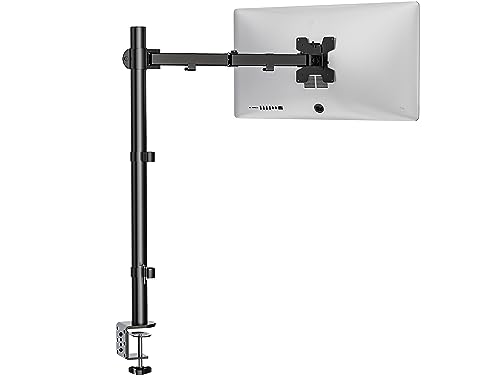
The WALI M001XL provides a robust single-arm solution for desks up to 32 inches and supports up to 22 pounds. It offers two mounting methods: C-Clamp and 3.5-inch Grommet-Base, making it versatile for different desk configurations up to 3 inches thick. The arm extends and retracts with high-grade flexibility, plus +/-90° tilt and swivel, and 360° rotation for easy landscape-to-portrait transitions. This model is well-suited for users who share screens or require frequent reorientation for presentations or collaborative work sessions.
BYMECOST 3 in 1 Desk Extension & Monitor Shelf

The BYMECOST 16.5″ desk extension turns a portion of your desk into a functional shelf for monitors and accessories, supporting up to 55 pounds. It uses sturdy C-Clamps and includes a freestanding leg option for additional stability. The elevated platform measures 16.5″ by 9.8″ and is designed to position laptops or monitors at an ergonomic height, promoting better viewing angles and reduced neck strain. This option is ideal for users needing extra storage and a secondary display stand in compact workspaces.
BYMECOST 3 in 1 Desk Extension & Monitor Shelf (Second Variant)

This BYMECOST model mirrors the first desk extension concept with a 16.5″ by 9.8″ platform and 55-pound capacity. It emphasizes sturdy C-Clamps and a freestanding leg design, making it easy to install on various desks. The monitor shelf elevates screens for a more comfortable viewing position and facilitates better air circulation and space organization on crowded desks. It’s suitable for users seeking a compact desk extension paired with a monitor stand for laptops or second displays.
ULTRARM Heavy Duty Monitor Arm

The ULTRARM MA20P-S is a premium single monitor arm designed for ultrawide and large screens up to 57 inches and 44 pounds. It features a built-in pneumatic spring system for weight adjustment, clear cable management, and a quick-release VESA plate for straightforward installation. With +25° to -25° tilt, 180° swivel and 180° rotation, plus 13 inches of vertical height adjustment, it offers precise control for users who require high flexibility to accommodate different work tasks, gaming, or design work on wide displays.
MOUNTUP Ultrawide Monitor Arm
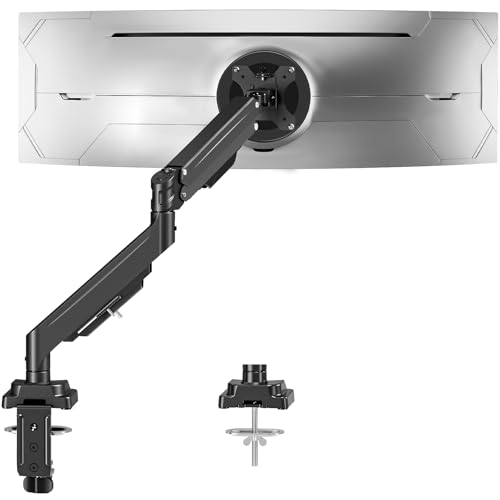
The MOUNTUP ultrawide arm supports 22-43 inch monitors weighing 2.2 to 33 pounds, making it ideal for expansive curved displays. It offers robust gas-spring support, 360° rotation, ±90° tilt, and ±90° swivel, with up to 23.6″ extension and 22.4″ vertical adjustment. Users can choose between C-clamp or grommet mounting bases to fit desk construction and thickness, providing strong stability for large setups while maintaining flexible positioning for optimal viewing angles and reduced glare.
Buying Guide: Key Purchase Considerations
- Monitor size and weight: Ensure the arm supports your display size (13″–32″ typical; some ultrawide options exceed 32″) and weight (commonly 4.4–44 lbs). If you have a larger or heavier screen, prioritize higher weight capacity and wider VESA compatibility.
- Desk compatibility: Check desk thickness and construction. C-clamp bases work well for solid wooden desks, while grommet bases suit desks with integrated holes. If your desk has under-beam constraints or panels, consider a freestanding shelf or alternative mounting method.
- Reach and extension: Consider how far you need the monitor to extend from the desk. Longer arms improve access for multiple tasks but require more desk space and clearance above the surface.
- Ergonomics: Look for height adjustability, tilt, swivel, and rotation features to align the screen at eye level, reducing neck strain. A wide tilt range helps with glare control and reading comfort.
- Cable management: Integrated cable routing keeps cords organized and minimizes desk clutter, contributing to a cleaner workspace and easier repositioning.
- Multiple monitors vs. single: If you plan to run dual displays, consider dual-arm systems with independent movement or a single arm supporting one monitor with a shelf for the second display.
- Installation and stability: Review clamp range, grommet hole size, and weight distribution. A sturdy installation reduces wobble, especially with high-extension arms and heavier monitors.
- Maintenance and compatibility: Verify that the product uses standard VESA patterns (75x75mm or 100x100mm) and that mounting hardware fits your desk material and thickness.
These options offer a range of price points and configurations to help you optimize a compact workspace. When selecting, prioritize the combination of extension, weight capacity, and ergonomic adjustability that best aligns with your monitor size, desk setup, and daily tasks.