For multi-monitor productivity, a stable, fully adjustable triple monitor stand can transform your workspace. The following picks focus on durability, VESA compatibility, height and tilt range, and cable management to help you maintain an organized desk while maximizing screen real estate. Each option supports up to 27-inch monitors, with varying weight capacities and mounting styles to fit desk setup preferences—from clamp to grommet bases. Use this guide to compare strong, reliable choices for a three-monitor office or gaming station.
Summary of chosen products
| Product | Brand | Max Per Arm | VESA | Mount Type |
|---|---|---|---|---|
| WALI Triple Monitor Stand MF003 | WALI | 22 lbs | 75x75mm / 100x100mm | Free Standing or Grommet |
| HUANUO Triple Monitor Mount | HUANUO | 17.6 lbs | 75x75mm / 100x100mm | Arm Extension with Desk Clamp |
| MOUNTUP Triple Monitor Stand Mount | MOUNTUP | 4.4-19.8 lbs per arm | 75x75mm / 100x100mm | Gas Spring Arms |
| WALI GSDM003XL Triple Monitor Mount | WALI | 19.8 lbs | 75x75mm / 100x100mm | Gas Spring, Clamp or Grommet Base |
| ErgoFocus Triple Monitor Stand | ErgoFocus | unknown listed | 75x75mm / 100x100mm | Long Shelf Stand |
WALI Triple Monitor Stand MF003 — Free Standing or Grommet

Designed to hold three screens up to 27 inches, this stand offers a 16-inch pole height range and a center monitor tilt of ±15°, with side monitors tilting up to ±90° and swiveling 360°. Each arm supports up to 22 lbs, and the base options include a 4” diameter grommet mount or free-standing V-base for flexible desk configurations. The mounting plates detach and are compatible with VESA 75x75mm or 100x100mm patterns, making this a versatile choice for a multi-monitor setup.
HUANUO Triple Monitor Mount for 13-27 Inches

Huanuo’s triple monitor stand features aerospace-grade aluminum construction and robust arms, supporting up to 17.6 lbs per arm. It provides a full range of motion, including 360° rotation, ±90° swivel, ±45° tilt, and a height adjustment of 12.2 inches. It fits monitors up to 27 inches with VESA 75x75mm or 100x100mm patterns and supports desk thicknesses from 0.39” to 3.15”. This model emphasizes stability and precise angle customization for presentations, gaming, or coding sessions.
MOUNTUP Triple Monitor Stand Mount

Universal compatibility supports most flat or curved LCDs up to 27 inches, with arms handling 4.4-19.8 lbs each. The two gas spring arms enable dynamic extension, retraction, and height adjustment, while the center screen height can be adjusted. Tilt ±35°, swivel ±90°, and 360° rotation facilitate landscape-to-portrait transitions. This model helps create extra desk space and features cable management to reduce clutter.
WESTREE Triple Dual Monitor Stand Riser

The WESTREE stand accommodates 2-3 monitors and includes a 13-inch drawer for storing small items. Its adjustable length ranges from 29 to 56 inches with a tilt capability of ±90 degrees. The design prioritizes monitor height and depth flexibility, offering a practical solution for those who need a combined monitor and storage riser for desk organization.
WALI Triple Monitor Mount GSDM003XL
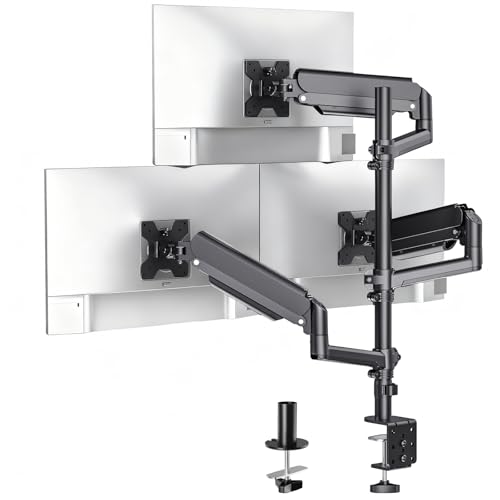
This WALI model extends support for three 17-32 inch screens with a maximum of 19.8 lbs per arm and VESA 75x75mm or 100x100mm compatibility. It uses a gas spring mechanism for smooth positioning, with clamp or grommet base options. Tilt ranges from +70° to -45°, a swivel of 180°, and 360° rotation to accommodate both landscape and portrait modes. A tall pole height can reach up to 41.4 inches for standing or sitting ergonomics.
ErgoFocus Triple Monitor Stand Riser

The ErgoFocus stand supports 2-3 monitors with a maximum weight capacity of 44 pounds, making it suitable for heavier setups. Length can extend from 31.3 to 52.9 inches with ±90° tilt and full 180° swivel. The design includes three shelves, with an extended middle board to accommodate keyboards and other peripherals, helping to free desk space and reduce clutter while keeping monitors at accessible heights.
Buying Guide: Key Purchase Considerations
- Monitor compatibility: Verify monitor size range (up to 27 inches) and VESA mounting patterns (75x75mm or 100x100mm). Ensure the weight per arm fits your monitors’ total load.
- Mounting style: Choose between clamp, grommet, freestanding, or a combination. Grommet bases require desk holes or prep, while clamps mount to the edge for quick setup.
- Adjustability: Look for tilt, swivel, and rotation ranges, plus height-adjustable poles. A gas-spring arm often offers smoother, easier repositioning.
- Desk space and ergonomics: Consider space-saving designs that elevate monitors off the desk. Height adjustability helps align eyes with the top of the screens for improved posture.
- Cable management: Built-in channels or clips reduce cable clutter, contributing to a cleaner workspace and less strain on cables.
- Build quality: Aluminum or steel arms provide stability and durability, particularly for heavier 27-inch panels. Check warranty and customer reviews for wobble or sag.
- Expansion options: If you anticipate changing monitors or adding more devices, select stands with flexible mounting and future-proof features like broad weight ranges and wide VESA support.
- Assembly: Consider ease of installation, included tools, and whether the center monitor height is easily adjustable for standing versus seated work.
When choosing among these options, balance the need for stability with the desire for flexibility. For high-intensity tasks requiring long hours, a sturdier gas-spring system and tall pole can reduce neck strain. If desk space is at a premium, a clamp or grommet base with a compact footprint and integrated cable management may better suit your setup. For heavier multi-monitor configurations, weight capacity per arm and the center monitor’s height adjustability are critical for maintaining alignment over time.