Finding the right desk riser can transform daily computer use by elevating screens to ergonomic eye level, freeing desk space, and improving airflow. This guide reviews five top desk monitor risers that fit American desks, balancing height range, storage, and build quality. Each option helps reduce neck strain while keeping essential accessories within reach. The selections below cover wood, metal, and mixed-material designs to suit different aesthetics and budgets. Use the buying guide to compare ergonomics, setup, and durability to choose the best monitor riser for your setup.
| Product | Brand | Key Benefit |
|---|---|---|
| WALI Computer Monitor Stand | WALI | Adjustable heights and ventilated design |
| WESTREE Dual Monitor Stand Riser | WESTREE | Two-monitor support with extra under-storage |
| KIVY Dual Monitor Riser | KIVY | Integrated aluminum shelf with sturdy wooden base |
| Across-Star Dual-Monitor Stand | Across-Star | Retractable length for flexible workspace |
| TechOrbits Standing Desk Converter | TechOrbits | 32-inch wide stand with sit-to-stand capability |
Each option offers a distinct approach to elevating screens and organizing the desktop. Below, five detailed product profiles provide specifications, materials, and how they address ergonomic goals, space constraints, and overall desk organization.
WALI Monitor Stand With Adjustable Heights

The WALI monitor stand is a compact, metal rack with a generous 14.6 x 9.3-inch platform. It supports up to 44 lbs and raises monitors or laptops by 3.9, 4.7, or 5.5 inches, providing multiple ergonomic heights. Rubber pads prevent slipping and protect the desk surface. Ventilated design helps keep devices cooler, reducing heat buildup during long work sessions. This option is well-suited for single-monitor setups or laptops with a stable base, offering a clean, minimal aesthetic.
WESTREE Dual Monitor Stand Riser

This dual-monitor riser combines wood and steel for a sturdy, stylish unit that can support two displays, a printer, or other devices. It includes anti-slip pads to prevent movement, with an understated rustic finish. The model offers additional storage space underneath, helping keep the desk tidy by stowing office supplies, making it ideal for multi-monitor setups in compact workspaces or home offices.
KIVY Dual Monitor Riser With Shelf
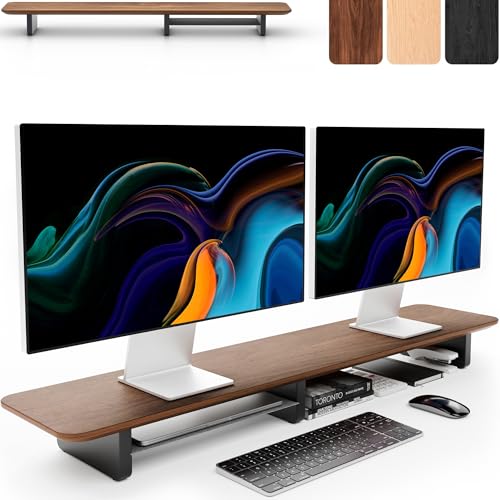
The KIVY desk riser features an integrated aluminum shelf atop a wooden base, increasing usable space by up to 50%. The hardwood construction delivers a robust platform capable of supporting wide or dual-monitor configurations. Its ergonomic height adjustment aims to reduce neck strain while the shelf provides convenient storage for desk essentials, elevating both form and function in professional settings.
Across-Star Dual-Monitor Stand Riser

The Across-Star riser offers an adjustable length from 32 to 40 inches, allowing flexible setups from single to dual-monitor configurations. Its under-platform space is sizable enough for keyboards and other essentials, helping maintain a tidy workstation. The ergonomic shelf design positions screens at eye level, potentially reducing neck strain and promoting a more comfortable posture during extended tasks.
TechOrbits Standing Desk Converter

The TechOrbits standing desk converter is a 32-inch-wide platform with a pneumatic lift system, enabling quick height changes from 4.3″ to 19.7″. It includes a keyboard tray and supports up to 33 lbs. This model emphasizes a sit-to-stand workflow, facilitating dynamic work sessions and improved circulation. It accommodates a large monitor or two devices, making it a versatile option for home offices and flexible work environments.
Buying Guide: Key Considerations For Choosing A Desk Riser
- Ergonomic height range: Choose a model that places your monitor at or slightly below eye level when seated, reducing neck strain.
- Monitors and device compatibility: Consider weight limits and width support for single or dual displays, plus room for a keyboard and mouse below the shelf.
- Material and durability: Metal frames tend to be sturdier for heavier setups; wood and mixed-material designs offer aesthetics and storage.
- Ventilation and heat management: Ventilated shelves prevent overheating for laptops and all-in-one devices.
- Under-shelf storage: Extra space for accessories, cables, or notepads helps maintain a tidy desk.
- Adjustability: Height-adjustable and/or retractable-length designs offer flexibility for different tasks and users.
- Assembly and ease of use: Look for models with simple setup and minimal maintenance requirements.
- Desk compatibility: Measure desk depth and edge clearance to ensure the riser fits without obstructing wrists or legs.
- Aesthetics and decor: Choose finishes that align with your workspace style—industrial metal, rustic wood, or modern composites.
The selections above cover a range of priorities: from maximum ergonomic height with the WALI and TechOrbits to space-saving, dual-monitor arrangements with WESTREE and Across-Star, to premium wood-based designs with KIVY. When evaluating price versus value, consider how often you sit, how many monitors you use, and whether you prioritize storage space or clean lines. Each option contributes to a healthier, more efficient workflow by elevating screens and organizing the desktop in a way that supports sustained productivity.