Finding a sturdy, spacious desk setup that accommodates three monitors without clutter can boost productivity and comfort. This guide highlights five top triple-monitor stands and risers designed for large screens, solid weight capacity, and flexible positioning. Each selection is evaluated on stability, adjustability, compatibility, and value to help American buyers choose a reliable desktop solution for gaming, coding, or design work.
Summary Table — Selected Products
| Product | Brand | Max Screen Size | Weight per Arm | Mount Type |
|---|---|---|---|---|
| WALI Triple Monitor Stand MF003 | WALI | Up to 27″ | 22 lbs | Free-standing or grommet-base triple arm |
| HUANUO Triple Monitor Mount | HUANUO | Up to 27″ | 17.6 lbs per arm | Desk-mounted triple arm |
| MOUNTUP Triple Monitor Stand Mount | MOUNTUP | Up to 27″ | 4.4-19.8 lbs per arm | Gas-spring triple arm |
| VIVO Triple LCD LED Desk Stand STAND-V003E | VIVO | Up to 30″ | 10 kg per arm | Free-standing triple arm |
| MOUNT PRO Triple Monitor Mount | MOUNT PRO | Up to 32″ | 17.6 lbs per arm | Gas-spring triple arm |
WALI Triple Monitor Stand MF003

WALI’s MF003 supports three LCD or LED monitors up to 27 inches with a total weight capacity of 66 lbs across all arms (22 lbs per arm). It offers detachable mount plates and height adjustments via a 16-inch center pole. Both freestanding V-Base and 4” diameter grommet-base mounting options fit desks from 0.3” to 2.4” thick for flexible installation. The arms allow full height and tilt adjustments, including a ±90° tilt and 360° rotation to switch between landscape and portrait modes. This model is designed for quick reconfiguration to accommodate different workflows.
HUANUO Triple Monitor Mount

Huanuo’s triple monitor system delivers rock-solid stability with aerospace-grade aluminum and arms engineered to support up to 17.6 lbs per monitor. It includes a broad range of motion: 360° rotation, ±90° swivel, ±45° tilt, and a 12.2-inch height adjustment. Compatible with 75×75mm or 100×100mm VESA patterns for monitors up to 27 inches, it also accommodates desk thicknesses from 0.39″ to 3.15″. The design emphasizes durability and precise control for gaming, design, or finance work requiring consistent screen alignment.
MOUNTUP Triple Monitor Stand Mount

Mountup’s three-monitor arm set is built to fit most displays up to 27 inches with VESA 75×75 or 100×100 patterns. Each arm supports 4.4–19.8 lbs, with options for C-clamp or grommet mounting based on desk construction. The arms offer tilt, swivel, and 360° rotation, plus a center monitor height adjustability and dual gas-spring mechanisms for easy extension and retraction. Cable management is integrated to help maintain a tidy workspace as you switch between tasks.
VIVO Triple LCD LED Desk Stand STAND-V003E
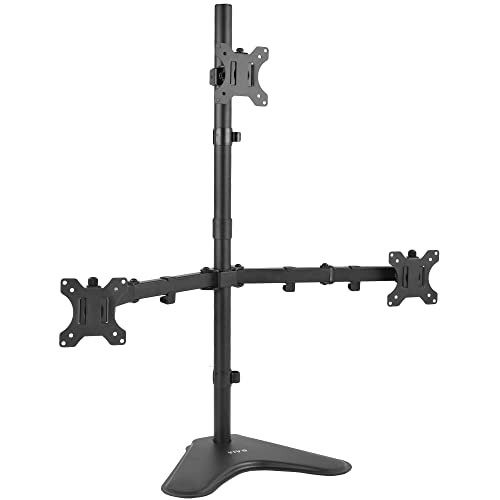
VIVO’s STAND-V003E supports three monitors ranging from 13″ to 30″ with a robust base for stability. Each arm handles up to 10 kg (approximately 22 lbs) and uses VESA 75×75mm or 100×100mm mounts. The arms offer +15° to -15° tilt, 360° swivel, and full 360° rotation for portrait or landscape setups. A cable management system helps maintain a clean look, while the free-standing design provides easy placement on any desk without drilling.
MOUNT PRO Triple Monitor Mount

The MOUNT PRO triple monitor arm system is designed for up to 32-inch displays, with each arm supporting up to 17.6 lbs and using VESA 75×75mm or 100×100mm patterns. It features full-motion gas-spring arms that tilt +90° to -90°, swivel up to 180°, and rotate a full 360° for portrait or landscape viewing. The tall 28-inch pole reaches up to 36.3 inches, enabling a comfortable standing or sitting position, and the system extends up to 18.1 inches to maximize desk space. This setup emphasizes ergonomic flexibility for long work sessions or intense gaming sessions.
Buying Guide: Key Purchase Considerations
- Screen size range and weight: Ensure the stand supports your monitors’ combined weight and individual specs. Look for per-arm capacity and total weight limits that exceed your setup.
- Mounting option: Decide between freestanding desks, grommet mounts, or C-clamps. Grommet mounts can save desk space but require drilling; freestanding bases are easier to relocate.
- Adjustability and ergonomics: Prioritize models with tilt, swivel, rotation, and height adjustment. Gas-spring arms often offer smoother, easier movement and positioning.
- Desk thickness compatibility: Check supported desk thickness for C-clamp and grommet options. Some products accommodate thin to very thick desktops.
- Cable management: Built-in channels or clip systems help keep cords organized and reduce clutter behind the monitors.
- Installation and compatibility: Verify VESA patterns (75×75 mm or 100×100 mm) and ensure the mounting method suits your desk layout and available space.
- Space optimization: Consider whether the design frees desk space effectively, especially for three-monitor configurations that can otherwise dominate a desk.
- Durability and warranty: Look for sturdy materials (steel or aluminum) and good warranty coverage to ensure long-term reliability for heavy or frequently adjusted setups.
- Future-proofing: If you anticipate upgrading to larger or heavier monitors, choose a mount with higher weight limits and broad adjustability.
These considerations help buyers compare models across stability, motion range, and ease of installation. By assessing per-arm weight limits, mounting options, and ergonomic reach, you can select a three-monitor system that matches your desk size, room layout, and work style.