Choosing the right monitor arm for curved displays can transform comfort and productivity. The following picks focus on heavy-duty, ultrawide-capable arms that support curved screens up to 49 inches, offer robust tilt, swivel, and rotation, and provide secure mounting options for a clean, ergonomic workstation. Each option balances durability, ease of installation, and full motion to optimize viewing angles for gaming, design work, or multiple-screen setups.
Summary of selected products:
- WALI Ultrawide Monitor Arm GSM001XL — Supports up to 49″ and 33 lbs, with VESA 75×75/100×100.
- HUANUO Single Monitor Arm 13-49″ — Holds up to 26.5 lbs, USB integration, VESA 75×75/100×100.
- HUANUO TitanLift Heavy Duty Arm — Ultrawide up to 49″, holds up to 40 lbs, aluminum build.
- ARES WING Ultrawide Monitor Arm — 17-49″ range, up to 44 lbs, gas spring, dual clamp options.
- HUANUO Heavy Duty Arm for 49″ Screens — 27-49″ range, up to 35 lbs, VESA 100×100.
WALI GSM001XL Ultrawide Arm Review

The GSM001XL is built to handle ultrawide monitors up to 49 inches and supports up to 33 pounds. It offers +45°/-45° tilt and +-90° swivel with 180° rotation, enabling landscape-to-portrait transitions for varied workflows. The mount provides both C-clamp and grommet basing, accommodating different desk setups, and accepts VESA patterns of 75×75 or 100×100. Durability is emphasized with a fatigue-tested frame suited for frequent readjustments, making this a practical choice for students, remote workers, and professionals seeking an ergonomic single-monitor arrangement for curved displays.
Key features include ultrawide compatibility, ergonomic adjustment, and durable construction. The mounting hardware supports long-term stability, and the gas-spring mechanism aids smooth, controlled positioning. With a strong focus on curve-friendly alignment, this arm reduces neck and eye strain while keeping the screen securely in view during intense tasks. Installation options accommodate desks with different edge profiles, thanks to both clamp and grommet bases.
HUANUO Single Arm for 13-49 Inches
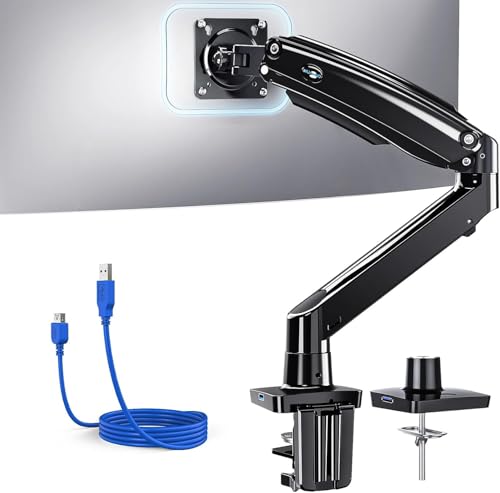
HUANUO’s single-arm solution fits 13″ to 49″ displays with a weight tolerance suitable for most curved screens (up to about 26.5 lbs). It supports tilt (+85° to -30°), swivel 180°, and rotate 360°, plus a generous height adjustment and extension range to align with standing desks or deep workstations. A notable feature is the built-in USB 3.0 port for data transfer and charging, which helps reclaim desk surface by routing cables through the arm. Its 21.1″ height and 25.6″ extension enable flexible positioning for large curved displays, promoting ergonomic viewing angles and reduced neck strain. VESA mounting supports 75×75/100×100 patterns for broad compatibility.
From a usability perspective, this HUANUO model emphasizes cable management and workspace efficiency, combining ergonomic reach with a compact footprint. The design is suited for users who need a single, highly adjustable arm to position a curved monitor exactly where it’s needed while keeping the desk surface uncluttered. The USB integration is a practical enhancement for modern workflows that rely on quick data access and portable peripherals.
HUANUO TitanLift Heavy Duty Arm
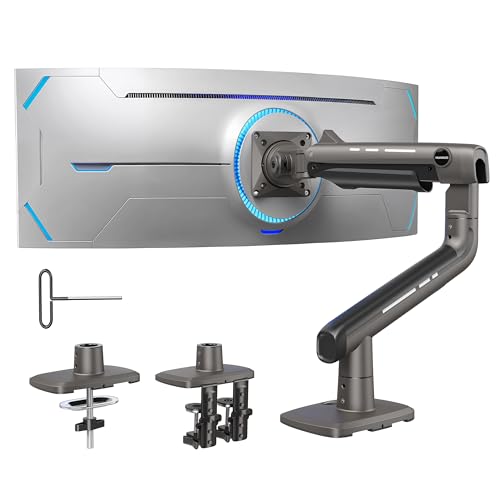
The TitanLift model targets ultrawide screens up to 49 inches and weights up to 40 pounds, with a reinforced aluminum head and thicker arms designed for heavy-duty support. It uses a gas-spring mechanism to adjust height and reach, delivering a maximum extension of about 24.8 inches and an adjustable height up to 19.6 inches. Tilt ranges from +50° to -50°, with 360° rotation and 180° swivel to tailor viewing angles. The mount supports VESA 75×75 or 100×100.
Durability is a primary focus, backed by fatigue testing and a wide base to ensure stable operation under frequent repositioning. This arm is well-suited for professional setups that demand robust performance for curved monitors, including design studios or gaming stations that require flexible, repeatable positioning for long sessions.
Installation notes emphasize versatile mounting options—C-clamp and grommet—along with a sturdy build that sustains dynamic motion without unwanted sag. If you need a single-arm solution that can securely support very large curved displays, TitanLift offers a compelling mix of strength and adaptability.
ARES WING Ultrawide Arm for 17-49 Inch

ARES WING’s ultrawide arm targets 17 to 49 inches with a substantial weight capacity of up to 44 pounds. It offers +50° to -20° tilt, 180° swivel, and 360° rotation, with a height range from 8.7″ to 18.7″ and maximum reach of 22.4″. This model emphasizes versatility for gaming and productive tasks, allowing precise ergonomic adjustments and a wide range of viewing positions. The dual clamp options include C-clamp and grommet base, facilitating desk compatibility across varying thicknesses and configurations. The frame construction prioritizes durability, integrating steel and aluminum to support long-term use with frequent repositioning.
Users benefit from flexible mounting choices and a robust motion profile, ensuring comfortable viewing angles for curved ultrawide monitors. The 22.4″ reach helps clear large desks and create space for peripherals, while the rotation and tilt enable configurations for immersive gaming or multi-task workflows. As with other ultrawide arms, checking monitor weight and VESA compatibility is essential before installation.
HUANUO Heavy Duty Arm For 49″ Screens

Designed for large screens up to 49 inches, this HUANUO arm supports 27-49″ curved displays with weight tolerance up to 35 pounds. It features 75x75mm and 100x100mm VESA compatibility and uses a heavy-duty mount that supports desk mounting via C-clamp or grommet methods. Adjustments include tilt from -60° to +15°, 360° rotation, and 90° swivel, plus a long reach to extend the monitor and position it for optimal ergonomics. The arm height can reach up to about 18.5 inches, allowing users to align ultrawide monitors for eye-level viewing and comfortable neck posture.
With a focus on large, curved displays, this arm balances strength with flexibility. The heavy-duty aluminum construction provides durability for daily adjustments, while the broad range of motion supports multiple work modes—from immersive gaming setups to multi-monitor production stations. As always, ensure compatibility with your specific curved monitor’s weight and VESA configuration before purchasing.
Buying Guide: Key Considerations For Curved Monitors
- Weight capacity and screen size: Curved and ultrawide displays demand higher weight limits. Check the arm’s maximum load and compare it to your monitor’s weight, including any mounting plate or adapters.
- VESA compatibility: Most curved monitors use 75×75 or 100×100 patterns. Verify that the arm offers these patterns or includes an adapter for nonstandard mounts.
- Mounting option: C-clamp is quick and tool-free but may limit desk thickness. Grommet mounts offer more stability for thick desks but require a hole-in-desk installation.
- Motion and reach: Tilt, swivel, and rotate ranges determine your ability to switch between landscape and portrait modes, adjust legibility, and reposition for different tasks. Gas-spring arms can offer smoother, one-handed adjustments.
- Desk compatibility and clearance: Ensure the arm’s arm clearance and base width don’t collide with other desk items. Consider table thickness, edge clearance, and cable routing.
- Cable management: Built-in channels help keep cables organized, which is especially helpful with heavy or long HDMI/DisplayPort runs common in ultrawide setups.
- Durability and warranty: Heavy-duty arms undergo frequent adjustments; look for fatigue-tested components and a solid warranty.
- Dual vs single arms: If you plan to stack or use two large curved monitors, a dual-arm design may reduce desk space strain and improve alignment, though it often adds cost and complexity.
- Ease of installation: Some arms come with easier top-side mounting and detachable VESA plates, which can simplify initial setup and future monitor swaps.
- Future-proofing: If you anticipate upgrading to larger or heavier curved displays, choose an arm with higher weight capacity and a sturdy base to avoid frequent replacements.
These products collectively address key priorities for curved-monitor setups: robust support for large displays, flexible motion for ergonomic comfort, and practical installation options. When choosing, balance weight limits, VESA compatibility, mounting style, and desk constraints to identify the arm that best fits your workspace and usage patterns.