Finding the right wall mount can free up desk space, improve ergonomics, and enhance viewing angles for work, gaming, and media. The following selections cover a range of budgets, weight capacities, and VESA patterns to fit most 13″ to 35″ screens. Each option provides full motion, sturdy construction, and reliable cable management. Use the summary below to compare key specs at a glance, then explore detailed sections on five top picks.
| Product | Screen Range | VESA | Weight Capacity | Notable Feature |
|---|---|---|---|---|
| MOUNT PRO Single Monitor Wall Mount | 13″ – 32″ | 75×75, 100×100 | Up to 17.6 lbs | Gas spring, full motion |
| WALI GSWM001 | Up to 32″ | 75×75, 100×100 | Up to 22 lbs | Gas spring, wide tilt/swivel |
| HUANUO Wall Mount | 22″ – 35″ | 75×75, 100×100, 200×200 | Up to 26.4 lbs | Extends up to 18.31″ |
| VIVO MOUNT-PC03V | PCs/Cases | Open frame, adjustable | Up to 10 kg | Open-frame design |
| Mount-It! Small TV Monitor Wall Mount | 19″ – 25″ | 75×75, 100×100 | Up to 44 lbs | Low-profile, tilt & swivel |
Note: All five selections support common VESA patterns and offer a blend of space savings, ergonomic adjustability, and straightforward installation. The focus is on wall-mounted options suitable for computer monitors and compact displays, ensuring compatibility with a range of setups—from home offices to shared workspaces.
MOUNT PRO Single Monitor Wall Mount

The MOUNT PRO wall mount supports 13″ to 32″ displays with VESA patterns 75x75mm and 100x100mm. Its gas-spring monitor arm offers +90° to -90° tilt, 180° swivel, and 360° rotation, enabling a full range of motion for work, presentation, or viewing from different angles. The arm extends up to 20.4″ to achieve the optimal viewing position, and the design helps free up desk space. It holds monitors weighing up to 17.6 pounds and includes a cable management system to keep cables hidden for a clean setup.
Key features include full motion adjustments for ergonomic flexibility and a slim profile when stowed. The mount is compatible with a variety of 13″–32″ screens, excluding certain high-curvature models. It’s suitable for office desks and creative workstations that require frequent angle changes and a clutter-free workspace.
WALI Computer Monitor Wall Mount

The WALI wall mount is designed for monitors up to 32″ with 75x75mm or 100x100mm VESA patterns. The sturdy gas-spring arm extends up to 19.3″ and retracts smoothly, offering tilt from +70° to -45° and swivel of ±90°, plus a full 360° rotation for landscape-to-portrait transitions. The mount’s durable construction supports up to 22 pounds. Its design emphasizes desk-space expansion and flexible viewing angles, making it a practical choice for multitasking, gaming, or media consumption in compact work areas.
Users should verify compatibility with curved or ultra-wide panels and confirm wall type compatibility (brick or wood). Cable management helps maintain a tidy appearance, while the open-architecture arm provides a clear line of sight to the screen for ease of use and access.
HUANUO Computer Monitor Wall Mount

The HUANUO wall mount accommodates 22″–35″ screens with weights up to 26.4 pounds and supports VESA patterns including 75x75mm, 100x100mm, 100x200mm, and 200x200mm. It offers tilt (+35° to -30°), 180° swivel, and 360° rotation for flexible positioning. This mount folds flat against the wall (about 3.15″ away) and extends up to 18.31″ horizontally, delivering a compact profile with substantial reach. Integrated cable management helps keep cords organized, contributing to a clean, organized workspace.
Consider screen compatibility carefully, especially if using curved panels beyond listed VESA patterns. The setup is well-suited for productivity tasks, gaming, and multimedia viewing in smaller rooms or behind desks with limited depth.
TooCust Heavy Duty Computer Wall Mount

This heavy-duty wall and under-desk PC mount from TooCust supports computer towers with adjustable width from 5.5″ to 9.8″ and height from 11″ to 21″. It is designed to improve heat dissipation by keeping the PC off the floor, while also freeing desk space. The mount is rated for up to 50 pounds, using thickened cold-rolled steel for durability. It is suitable for both wall- and under-desk mounting, making it versatile for various home or office configurations where space and airflow are priorities.
Potential considerations include ensuring the mounting surface can support load and fitting the case dimensions within the adjustable width and height. The design aims for a clean, accessible setup that minimizes obstruction and dust exposure to the PC.
StarTech Wall Mount CPU Holder

The StarTech CPU Holder offers an adjustable width between 4.8″ and 8.3″ with a sturdy metal frame, designed to secure desktop towers against the wall. It emphasizes unrestricted access to the computer while keeping the workspace uncluttered. The open-frame design ensures airflow around the tower and easy maintenance. This mount supports up to 22 lbs, delivering a solid balance of security and accessibility for desktop setups where vertical space is at a premium.
Potential limitations include ensuring the CPU’s dimensions fit within the adjustable range and confirming mounting compatibility with specific wall types and studs for maximum stability.
VIVO Universal PC Wall Mount
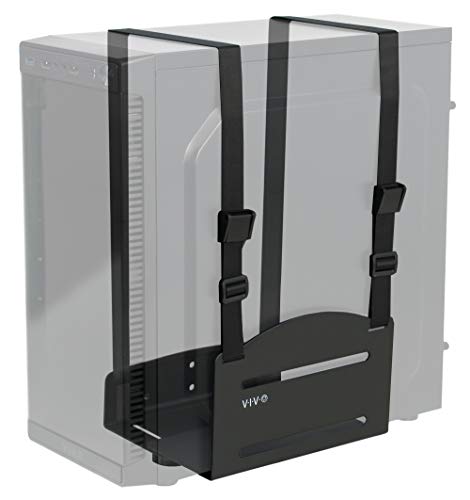
The VIVO MOUNT-PC03V focuses on wall-mounting a PC case with an open-frame design and adjustable straps for added security. It helps maximize floor space by keeping the PC on the wall, simplifying access and cable management. The mount accommodates cases up to 10 kg, providing a straightforward solution for small offices or rooms with limited desk area. The design supports easy mounting and offers enhanced accessibility for maintenance tasks.
Considerations include verifying the total dimensions of your PC and the distance from the wall when mounted, as well as ensuring compatibility with your case shape and ventilation requirements.
Buying Guide: Key Purchase Considerations
- Screen size and weight: Choose a mount that supports your display’s size and weight. Gas-spring arms often provide smoother motion but verify the mounting range and weight limits.
- VESA compatibility: Confirm the VESA pattern on your monitor (commonly 75x75mm or 100x100mm; larger patterns exist). Some mounts also support 200x200mm or non-standard patterns.
- Motion range: Tilt, swivel, and rotation capabilities determine how you’ll position the screen for comfort and productivity. Full-motion arms offer extensive flexibility for different tasks and seating positions.
- Mount location and space: Wall-mounting helps free desk space but requires proper wall support and accessible cable management. Under-desk options may be better for certain layouts.
- Installation and safety: Look for mounts with clear installation guides and robust hardware. Open-frame CPU holders offer accessibility but require secure mounting to studs or solid walls.
- Cable management: Integrated cable channels reduce clutter and protect cords from wear. This is especially beneficial in busy workspaces or multi-monitor setups.
- Maintenance and airflow: For PC-based mounts, ensure adequate ventilation. Under-desk and wall options should not obstruct fans or heat dissipation.
- Longevity and warranty: Choose reputable brands with warranties to safeguard against wear, defects, or recall issues over time.
- Compatibility notes: Some models exclude curved or ultra-wide screens, and certain VESA patterns may require adapters. Always verify before purchase.